How do I register someone as my client in Zoho books?
To register someone as your client in Zoho books it depends on whether they have already signed up for an account in Zoho or not.
If they havent signed up to Zoho yet, you should register them in your partner store under customer details "Add Organisation".
If your client has already signed up for Zoho use the following method.
Ask the client to tag you as their partner for Mail Suite. The client can use the link here to do so.
Tag Your Partner
Your customer should ensure that "MCP Access" check box is selected, when generating the token.
- Use the Map Customer link in Partner store to apply the token and map the customer to your partner store.
- Partner team will receive a approval request when you apply the token.
- Once the partner team approves, you will gain MCP access for your customer.
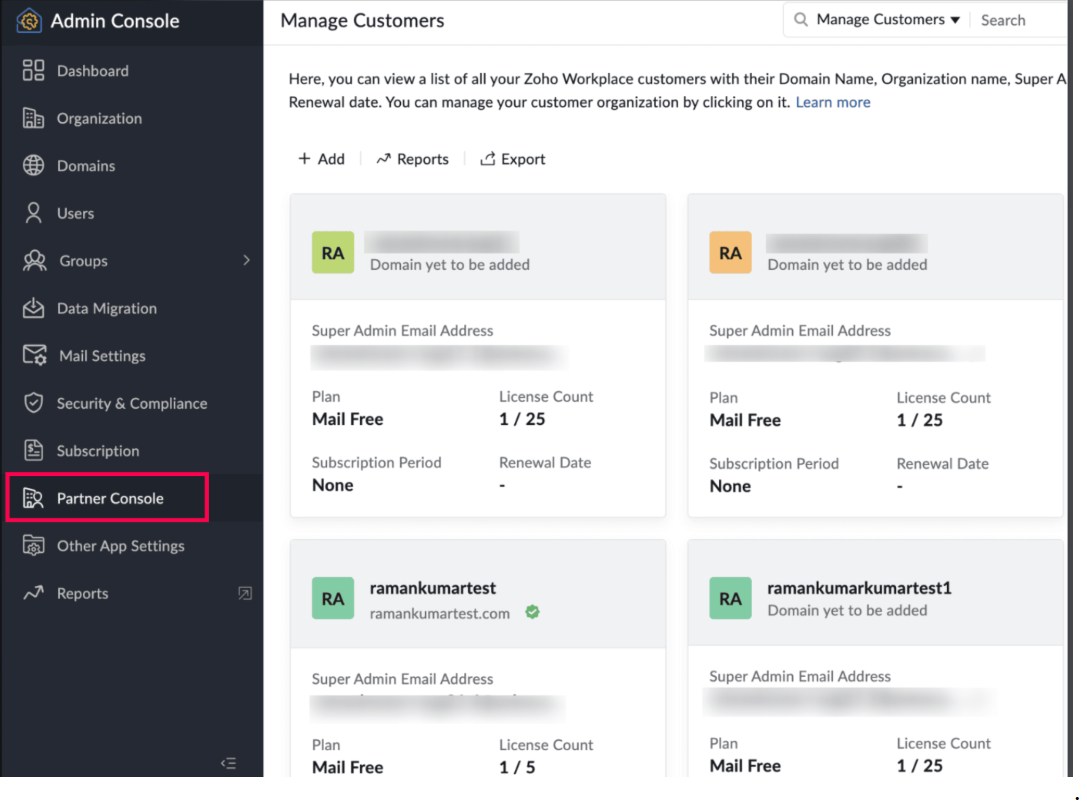
- After that ,you can manage this customer from Manage Customer page under this link https://mail.zoho.com/cpanel/index.do . A sample page is given below:
How do I register someone as my client in Zoho books?
To register someone as your client in Zoho books it depends on whether they have already signed up for an account in Zoho or not.
If they havent signed up to Zoho yet, you should register them in your partner store under customer details "Add Organisation".
If your client has already signed up for Zoho use the following method.
Ask the client to tag you as their partner for Mail Suite. The client can use the link here to do so.
Tag Your Partner
Your customer should ensure that "MCP Access" check box is selected, when generating the token.
- Use the Map Customer link in Partner store to apply the token and map the customer to your partner store.
- Partner team will receive a approval request when you apply the token.
- Once the partner team approves, you will gain MCP access for your customer.
- After that ,you can manage this customer from Manage Customer page under this link https://mail.zoho.com/cpanel/index.do . A sample page is given below: